

Choosing a smart thermostat for infrared heating
, by Warmteshop, 17 min read
The right smart thermostat for infrared heating is suitable for electric heating and can switch the total power of the panels you want to control. This way, you regulate the heat per room and prevent …
The right smart thermostat for infrared heating is suitable for electric heating and can switch the total power of the panels you want to control. This allows you to regulate the heat per room and prevent panels from continuing to heat unnecessarily. Infrared heats objects and surfaces directly, so you experience warmth where you need it.
Wi-Fi and app control are convenient, but also pay attention to the connection and the maximum switching load. A thermostat designed for a different type of heating does not automatically work with infrared panels.
In this article, you will read how infrared heating works and which smart thermostat is suitable for it. You will also discover what to look for if you want to save energy, control multiple panels, or set the heating per room. This way, you choose a control system that matches your home, daily routine, and the output of your panels.
A smart thermostat works with infrared panels if it can switch electric heating and is compatible with the connection. You can control the temperature remotely using Wi-Fi and an app. Therefore, also check how the thermostat controls the panel. A model designed exclusively for central heating or water heating is not automatically suitable for electric infrared heating.
With a Wi-Fi thermostat, you can adjust the temperature via your smartphone or tablet. If you are on your way home, you can switch on a panel before using the room. If you leave earlier than planned, you can switch off the heating remotely. The app controls the thermostat, which transmits the heating signal to the panel or the associated receiver.
A schedule makes operation more efficient. For example, you can set the heating in your home office to be active only during your usual working hours. For the bedroom, you set a different schedule tailored to your daily rhythm. This way, you heat rooms primarily when you are using them, instead of having all panels switch on at the same time. You can adjust the schedule when your plans change.
When making your choice, also consider the temperature sensor. A thermostat measures the temperature at the location where the sensor is placed. If that spot is in the sun, near a window, or close to a heat source, the measurement may deviate from the temperature in the rest of the room. The placement and compatibility of the sensor also determine how the control system responds.
Which smart thermostats support floor sensors or external temperature sensors? These are models with a connection or support for the relevant sensor. The capabilities vary per thermostat. With infrared underfloor heating, a thermostat can use a room sensor and a floor sensor. The floor sensor then monitors the maximum floor temperature.
What rules apply in the Netherlands to thermostats and electric heating? The general practical rule is that the thermostat must be suitable for electric heating and connected according to the product instructions. A control system for central heating or water heating is not automatically suitable for infrared panels. During installation, also follow the regulations and safe distances specified in the manual.
How much does a smart thermostat for infrared heating cost in the Netherlands? The price depends on the features and required components, such as Wi-Fi control, a receiver, or a sensor. Consequently, a wireless thermostat with app control may be priced differently than a simple control system. First, determine what control your panel and usage situation require.
What are common problems with smart thermostats for infrared heating? An unsuitable thermostat, a misplaced sensor, or an interrupted Wi-Fi connection can impede control. A panel may also fail to turn off if the receiver does not receive a signal. In the event of a malfunction, first check the connection, the set temperature, and the connection according to the manual. Also, keep the software of Wi-Fi thermostats up to date to support operation and security.
If you want to compare different types of panels, it helps to consider the application for each room. Infrared heating for a specific room requires a control system that suits how you use that room and connect the panel.
Saving starts with heating at the times and places you use. A smart thermostat for infrared heating helps adjust the temperature to your daily rhythm.
The higher and longer you heat, the more electricity infrared heating can consume. A thermostat switches off the panels as soon as the set temperature is reached. Set a suitable schedule for each room, tailored to your presence. If you are not using a room temporarily, lower the temperature. This way, you limit unnecessary heating hours without treating all rooms the same.
A smart thermostat can provide insight into set temperatures and heating schedules. This allows you to see when the system is calling for heat and compare the settings with your usage. Also keep track of meter readings for actual power consumption. Compare periods with similar outdoor temperatures and usage. This allows you to better assess changes, rather than immediately attributing them to a single setting.
Also check which data the app displays. A schedule or set temperature does not automatically provide a complete overview of power consumption. Record meter readings alongside the settings and keep track of changes in your usage. Lighting is a separate power consumer and can influence a comparison of total electricity consumption.
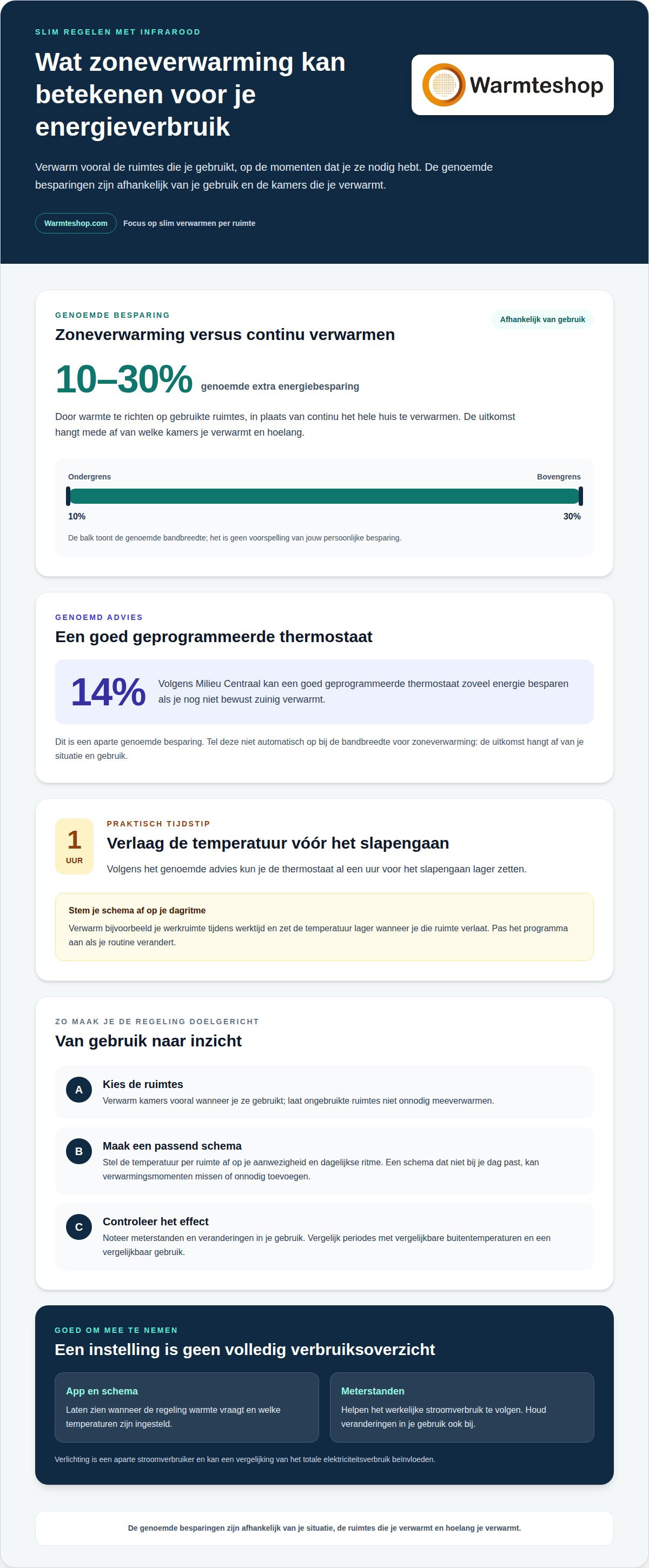
Zone heating directs heat to occupied rooms rather than continuously to the entire house. The stated savings amount to 10 to 30% extra energy compared to continuous heating. According to Milieu Centraal, a well-programmed thermostat can save 14% energy if you are not yet consciously heating economically. The outcome depends partly on which rooms you heat and for how long.
Start with your daily rhythm. For example, heat your workspace during working hours and turn down the thermostat when you leave the room. According to the advice mentioned, you can lower the temperature as early as an hour before going to bed. Adjust the program when your routine changes. A schedule that does not fit your day may miss heating times or add unnecessary ones.
The measurement location matters too. Place the thermostat where the measured temperature is representative of the room. An unfavorable location can cause the control system to switch off too early or, conversely, to require heat for longer. After installation, always change one setting at a time and note the effect. This way, you can better see which adjustment helps.
Compare the settings of your smart thermostat for infrared heating to your actual usage. Compare meter readings and schedules over periods with similar conditions. This way, you will discover if another program is limiting the heating hours. Then, only adjust settings that do not align with your daily routine.
With infrared heating and thermostats for temperature control, you can tailor the operation to your rooms and routines. Targeted settings reveal where you can limit heating hours.
A thermostat regulates when electric panels emit heat. The right combination depends on the connection and the functions you want to use.
Is a smart thermostat suitable for electric infrared heating? Yes, if the model can control electric heating and matches the connection. A thermostat designed exclusively for central heating or water heating is not automatically suitable. Check which switch or receiver your panel requires.
With wireless control, the system often consists of a thermostat transmitter and a receiver. The transmitter is battery-operated and controls the receiver via a radio signal. The receiver is positioned between the thermostat and the infrared panel and switches the heating on and off according to the set temperature. This allows the thermostat to be mounted in a suitable location without being directly connected to the panel.
Solar panels do not change the basic operation: a thermostat switches the heating on based on the set temperature. It does not automatically measure how much solar power is available. If you want the heating to work in conjunction with your own power generation, the entire system must support that connection. Therefore, the functions of a thermostat app do not automatically mean that it responds to solar production.
A practical example: you set the living room thermostat for use during the evening. The transmitter reports the heat demand, and the receiver switches on the panel. In a separate workspace, a dedicated control system can follow a different schedule. This way, you tailor the control per room to usage, without a single thermostat having to keep all rooms at the same temperature.
How do you safely connect a smart thermostat to infrared panels? Follow the manufacturer's wiring diagrams and safety instructions and use the correct receiver for the system. Turn off the power supply before performing any work. Have the installation carried out by a qualified installer if you are unsure about the connection. Incorrect connection can pose electrical risks.
Before making your choice, create an overview of the components: panel, thermostat, receiver, and any sensors. Then, compare the prescribed connection method with the functions you want to use, such as app control or a schedule. With infrared underfloor heating, a thermostat can combine a room sensor with a floor sensor. The latter monitors the maximum floor temperature and helps protect the floor.
After installation, test operation with a single set temperature. Check if the receiver responds when the thermostat requests heat and switches off as soon as the set value is reached. Also follow the instructions for updates to Wi-Fi thermostats. Regular updates help optimize operation and limit security risks.
A thermostat or receiver can only switch a specific electrical load. Therefore, for multiple panels, first add up the power and compare the total with the maximum load of the switching component. This way, you can see whether a single control system can control the panels together or if a different distribution is required.
Calculation example: eight panels averaging 400 watts each require a total of 3,200 watts when heating simultaneously. The total power, not just the power of a single panel, determines the load. The mini built-in receiver has a maximum current of 5 amperes. The QH dimmer for infrared panels has a maximum power of 1,200 watts. These are different values for different components; therefore, always compare the correct maximum with the connected equipment.
Most thermostats support a switching load of up to 16 amperes. This figure does not automatically apply to every receiver, dimmer, or thermostat. Read the product specifications and add up the power ratings of all panels switching simultaneously. If the load exceeds the limit of the component used, distribute the control across separate, suitable groups. Connecting to a smart home system does not change the maximum electrical load.
Placement also influences how efficiently the panels heat. A panel heats surfaces and objects within the range of radiant heat. Consider where you want to feel warmth in each room and take into account any obstacles between the panel and your seating area. For example, a panel above a table may provide a different heat distribution than a panel mounted on the wall. The correct position depends on the layout and use of the room.
With multiple panels, good distribution can be more important than concentrating everything in one place. Distribute the panels so that the desired zones receive heat. Next, determine whether a single thermostat should switch all panels simultaneously, or if separate rooms require their own control. This choice determines how you group the receivers and the load each switch receives.
Keep maintenance simple: clean panels regularly with a soft, dry cloth. Avoid harsh cleaning agents, as they can damage the surface. Only clean a panel when it is switched off and has cooled down. At that time, also check the visible connections for damage without opening any electrical components. This way, you limit maintenance to the panel and the surface.
A useful check consists of three data points: the power of each panel, the combined power per switching group, and the maximum load of the receiver or dimmer. For example, note down the eight panels from the calculation example individually and compare their total of 3,200 watts with the specifications of the selected components. This prevents a smart home scheme from controlling more panels simultaneously than the switching component can handle.
A suitable control system does more than just switch on heat remotely. It must match the electric heating, the type of panel, and the operation you desire. The best choice therefore depends on the connection as well as the functions you actually use. For a single panel, simple temperature control may suffice. With multiple panels in a room, you must also consider the combined switching load.
What is the difference between a smart thermostat, a smart plug, and a thermostat for infrared panels? A smart thermostat controls the heating based on temperature and settings. A smart plug switches the power supply via a socket but does not automatically measure the temperature. A thermostat for infrared panels is intended to control electric heating and can be a plug-in, wireless, or built-in model.
With a socket thermostat, the setup is simple: you plug the thermostat into the socket and the panel's plug into the thermostat. The control system can then switch the panel on and off based on the set temperature. This type is particularly suitable for a panel with a plug connection. For a fixed connection, you need a thermostat and connection method designed for that purpose.
A wireless thermostat is convenient when you want to measure the temperature in a different location than where the panel is installed. The thermostat transmitter is battery-powered and communicates with a receiver. This allows you to choose the measurement location based on room usage, rather than just the panel's position. The exact features vary by model.
Advanced features are particularly useful if they fit your routine. With a schedule, you adjust the heating to fixed usage times. Some smart thermostats learn from your living patterns and recognize when heating is desired. The learning period usually takes a few weeks. If you want to stay in charge yourself, a manually adjustable schedule gives you more direct control.
Also pay attention to the measurement method. A room sensor responds to the temperature in the room. With infrared underfloor heating, a thermostat can additionally use a floor sensor to monitor the maximum floor temperature. The requirements therefore differ per application: a wall panel and underfloor heating do not necessarily require the same sensors or installation.
If you use a single thermostat for multiple panels, first compare the total power with the maximum switching load. A smart app makes operation more accessible but does not increase the electrical capacity of the receiver. Nor does a connection to a smart home system replace that technical check. Choose the control system based on the connection, sensors, and load, not just on the number of functions.
When choosing thermostats for electric heating, which controls and sensors are compatible with your panel. This prevents you from selecting features that the installation does not utilize, or a control system that does not match your heating system.
Warmteshop helps you tailor infrared heating to the room and your desired control. For example, choose an infrared panel for targeted heat, or view an infrared mirror and infrared glass heating for applications where panel and interior come together.
Do you already have a thermostat in mind? Then pay attention to the connection, the temperature sensor, and the total power the thermostat can switch. These details will help you determine which combination suits your panels and daily use. This way, choose not only based on smart features but also on suitable control.
Would you like to discuss your situation or explore the possibilities? Contact Warmteshop or visit Warmteshop.com.
A smart thermostat for infrared heating is particularly valuable if the controls suit your lifestyle. Consider which rooms you want to keep comfortable, when you use them, and how much independent control you want. These choices help determine which combination of thermostat and heating suits your home.
At Warmteshop, you can tailor infrared heating to various applications. An infrared panel can provide heat in a living or working space, while an infrared mirror combines heating with a mirrored surface. Start with the place where you want to experience warmth, and then choose a suitable panel and control system. This way, technology becomes a practical step towards comfortable living.
Discuss your heating choice with Warmteshop and explore which solution suits your space. With a well-considered choice, you turn daily comfort into a natural step forward.
Infrared heating emits heat to surfaces and objects in the room. Consider a chair or floor within the panel's range: these absorb radiant heat and release it gradually. As a result, the heat feels different compared to a system that primarily heats the air first. The placement also determines where you experience the heat. Therefore, take furniture and your regular seating into account.
Yes, multiple panels can operate together on a single thermostat if the receiver and connection are suitable for the combined electrical load. To do this, add up the power of all panels that can switch on simultaneously. You can also distribute the panels across separate control groups. This way, for example, you control the panels in a living room together and regulate a panel in a study independently.
A thermostat switches off the heating when the measured temperature deviates from the set value. This prevents a panel from continuing to heat when the desired temperature has already been reached. You can also use a program for specific times, such as heat during breakfast. Without a thermostat, you have to switch the heating on and off yourself, which means it easily remains active longer than intended.
With a separate thermostat for each room, you tailor the temperature to that space's usage. A bathroom, for example, might require heat at different times than a bedroom. With separate controls, a single measurement does not determine the heating of the entire house. This is useful if rooms are used differently or if panels are needed at varying times.
Choose a model that can switch electric heating and matches your panel's connection. Also, check if the thermostat works with the required receiver. For infrared underfloor heating, a floor sensor can be relevant, as it monitors the maximum floor temperature. A thermostat designed exclusively for central heating or water heating is not automatically suitable for infrared panels.
First, set the desired temperature or a schedule on the thermostat or the accompanying app. The thermostat measures the temperature and sends a signal to the receiver when there is a demand for heat, which then switches on the panel. You can, for example, set the control so that a hobby room is heated around your usual working hours. After setting it up, check whether the panel responds to the heat demand.
Power consumption depends primarily on the output of the panels and the actual heating time. For conventional infrared panels, a consumption of 60 to 80 W/m² is cited. The thermostat does not reduce the output of an activated panel, but can limit the heating duration by switching off the panel as soon as the set temperature is reached.
The potential savings depend on your previous heating habits and settings. According to Milieu Centraal, a well-programmed thermostat can save 14% energy if you are not yet consciously heating economically. A schedule helps limit unused heating times. Compare your consumption with a similar period and note changes in usage so you can see if an adjustment coincides with lower power consumption.


