
Smart plug for infrared heating: consumption and costs
, by Warmteshop, 16 min read
, by Warmteshop, 16 min read
A smart plug does not make an infrared panel more energy-efficient, but it can prevent it from staying on longer than necessary. With a smart plug for infrared heating, you control the panel via your smartphone and set a …
A smart plug does not make an infrared panel more energy-efficient, but it can prevent it from staying on longer than necessary. With a smart plug for infrared heating, you control the panel via your smartphone and set a timer or programmable schedule. You can view the power consumption in a monthly overview.
It is understandable that you want to know if such a plug helps save energy. The advantage lies primarily in the control: you schedule heating times and switch off the panel when you don't need it. This way, you maintain better control over usage and enjoy radiant heat at the moments that matter to you.
In this article, you will read how to estimate consumption and monthly costs, the role the settings play, and how to install the plug. You will also discover what to look out for when connecting it and how a 24-hour schedule helps you switch the heating on or off at fixed times.
A smart plug does not automatically reduce the power of an infrared panel, but it does help prevent unnecessary operating hours. With the QH WiFi Plug-in Switch, you control light electrical appliances, including infrared panels. Set fixed times for the panel to turn on and off, so that the heat aligns with how you use the room.
For example, set up a schedule for a home office so that the panel only operates around the times you are there. If you are not using the room, you prevent the panel from staying on unnecessarily. This way, you enjoy targeted, comfortable heat without having to constantly manually operate the plug.
When setting it up, pay particular attention to when you need heat. Infrared heating emits radiant heat towards people and surfaces. Therefore, align the switching times with your daily routine, such as working from home or relaxing in the evening. A suitable schedule supports conscious use but does not change the electrical output of the panel.
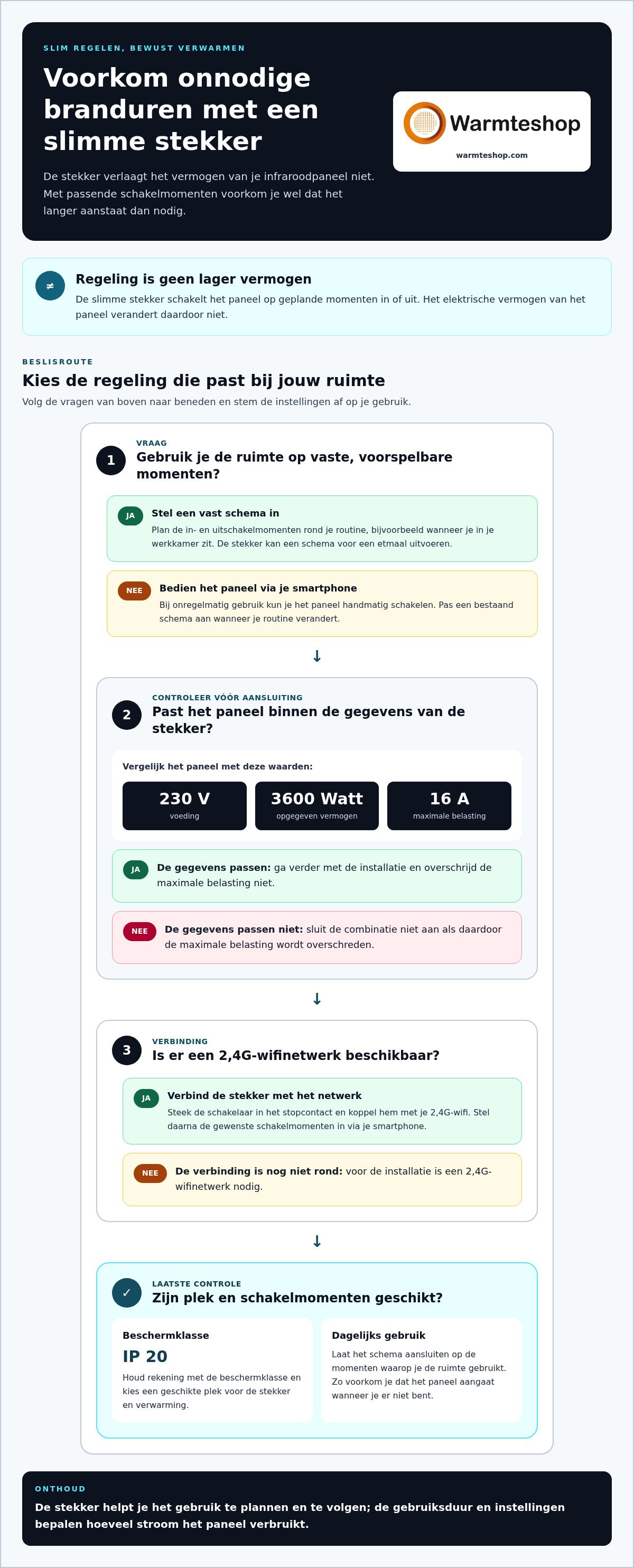
Also check the electrical capacity before connecting. The Wi-Fi plug switch has a power supply of 230 V, a specified power of 3600 Watts, and a maximum load of 16 A. Compare these values with the panel's specifications. The plug is intended for light electrical appliances, including infrared panels. Do not exceed the maximum load.
A schedule works best when it aligns with your actual usage. If the panel is in a room you use infrequently, control it via your smartphone. Use fixed programs for predictable times. This prevents a schedule from switching on the heating when you are not using the room.
When choosing a panel, also consider the available infrared heating options and determine which room you want to heat. A smart plug assists with operation, but the operating time and settings determine how much power the panel consumes. Therefore, keep those settings tailored to your daily needs.
When choosing a smart plug, don't just look at the purchase price, but also compare the features you actually use. The QH WiFi Plug-in Switch is suitable for infrared panels. Look up the model by product name and check if it fits your panel and usage situation.
First, determine which control method you need. If you primarily use fixed switching times, a programmable schedule is relevant. If you want to monitor consumption, the monthly overview is useful. Ask yourself whether your household actually uses the functions you are paying for. For example, a panel in an office requires different controls than heating in a room you use intermittently.
Additionally, pay attention to the product specifications. The switch has dimensions of 50 x 50 x 45 mm. Measure the available space around the socket before making a choice. The EAN code is 6013753461404. This number helps you verify that you are viewing information about exactly the same version. This prevents confusion between similar switches with different functions.
Also check which features correspond to the price. You can only compare products properly if you place the same components and capabilities side by side. Therefore, note down the name, smartphone control, and available timer and programming functions for each model. A cheaper alternative is not automatically equivalent if a feature you need is missing.
Another cost factor is the heating itself. The smart switch controls the activation but does not replace the infrared panel. Therefore, first determine which panel suits the room. For example, view the available infrared heating for different rooms. This way, you are not comparing the plug in isolation from the application for which you want to use it.
Finally, distinguish between purchase and usage. The purchase costs concern the switch and the chosen panel. Consumption depends on how long the panel heats and on your electricity tariff. A timer can help prevent unnecessary usage hours. Therefore, evaluate the investment based on both operation and daily use, not just the price of a single product.
The Wi-Fi plug switch for infrared heating is offered for €39.00. The product price includes 21% VAT. Keep this in mind when comparing the purchase price to that of another switch: compare amounts on the same basis and check whether the stated price also includes VAT. This prevents a difference on paper from being primarily due to a different way of displaying prices. The stated price provides you with a concrete starting point for weighing the functions you need against the amount you pay for them.
You can compare the original price with the offered price of €39.00, but also base your choice on the operation and application that are important for your household. A price comparison is most useful when you check which version and features are associated with each amount. Therefore, do not just look at the difference between the quoted prices, but also at what you want to control with the plug. This keeps the purchasing decision focused on the combination of cost and practical use.
Your monthly costs depend mainly on the panel's power consumption, the usage time, and your electricity tariff. The smart plug helps you monitor consumption. With the QH WiFi Plug-in Switch, you can view power consumption in a monthly overview. This allows you to calculate costs based on actual usage rather than an estimate.
Use three pieces of information for your calculation: the power output of your panel, the time it heats, and your electricity tariff. You can find the power output on the product label or in the product specifications. You can obtain the operating time from your schedule or consumption overview. Your energy bill states the rate you pay for electricity.
The calculation consists of two steps. First, multiply the power in kilowatts by the usage hours. This gives the consumption in kilowatt-hours. Next, multiply that consumption by your electricity rate per kilowatt-hour. This calculates the cost of the panel over the chosen period.
An example without assuming a rate: suppose you use a panel in an office. The monthly overview shows how much electricity the panel consumed that month. Multiply that consumption by the rate on your energy bill. The result is the calculated consumption cost for the panel.
Keep the plug and the panel separate in your calculation. The switch displays power consumption in a monthly overview, while the heating duration partly determines how much power the panel consumes. If you change the switching times, compare the overviews from different months. This way, you can see whether shorter or differently scheduled heating times change the measured consumption.
A programmable schedule can align usage with your routine. For example, set the panel to operate only when you are using the room. Then, view the consumption in the next monthly overview. A schedule does not automatically reduce power; it primarily affects when the panel uses power.
For a useful monthly calculation, use your own data, not a general amount. The panel capacity, actual usage time, and your electricity tariff together determine the outcome. With the monthly overview of the QH WiFi Plug-in Switch, you track consumption and then calculate the costs. If you adjust the settings, compare the same data again the following month.
Yes. The QH WiFi Plug-in Switch displays power consumption in a monthly overview and can be controlled via your smartphone. The switch also features a timer and programmable schedule functions. This allows you to combine insight into consumption with scheduled operation of your infrared panel.
With the monthly overview, you can view the power consumption of the connected device retrospectively. This is different from simply viewing the switching times: a schedule shows when the panel is on, while the overview provides insight into the measured consumption. Use both sets of data to better align the settings with your routine.
The timer is useful for a one-off switching event. For example, set it so that a panel switches off later. A programmable schedule is better suited for recurring moments, such as heating during fixed working hours. With the Wi-Fi plug, you can set a 24-hour schedule for switching on and off. This way, the panel does not have to remain on unnecessarily according to a manual habit.
Set the controls practically:
For a home office, for example, set a schedule around your usual working hours. If you use the room at other times as well, adjust the programmed times accordingly. For a room you use intermittently, control via smartphone may be more practical. The timer and schedule functions regulate the switching times but do not change the panel's power output.
Also take into account what the overview tells you. The monthly total shows the consumption over the entire month. When comparing months, note when you adjusted the settings. This allows you to compare changes in consumption with changes in the schedule. The overview is therefore useful for looking back, while the timer and the 24-hour schedule help you plan ahead.
The combination is particularly useful if you want both insight and fixed control. Use the monthly overview to monitor power consumption. Set a timer via your smartphone for a one-off event or program a recurring schedule. With a smart plug for infrared heating, these functions complement each other: the meter provides insight, while the timer and scheduling handle the operation.
View the metering function and controls as two separate tools. The energy meter provides insight into consumption retrospectively; the timer and schedule determine when the panel is switched. Therefore, do not just look at the schedule, but also use the monthly overview to monitor consumption trends. Take changed settings into account when viewing the overview. This way, you assess your usage pattern without confusing the switching functions with a power adjustment.
The warranty is also relevant when choosing accessories for your heating. Accessories come with a 2-year warranty. The warranty is separate from setting the timer, programming a schedule, and viewing consumption. You can use these functions individually: choose scheduled operation that fits your routine and consult the monthly overview when you want insight into power usage. This ensures the smart plug remains usable for both daily operation and reviewing your usage.
The most important consideration is the electrical load. The Wi-Fi plug has a maximum load of 16 A and a specified power rating of 3600 Watts. Therefore, check the power rating of the connected panel. Only connect it if the values fall within the limit of the switch. Also include devices when using a power strip.
The switch's power supply is 230 V. Compare this with your panel's specifications before connecting. The plug is intended for light electrical appliances, including infrared panels. Do not use it for an application for which the switch is not intended. An appropriate power rating prevents overloading of the connected device.
Also pay attention to the IP 20 protection class. Therefore, place the plug in a dry place, away from splashing water and damp surfaces. Do not use it where water can reach the socket or connection. A bathroom, for example, requires extra attention regarding the placement of the socket and switch. Keep the product marking visible when checking the connection.
Check the plug, socket, and cable before use. Do not use the connection if you see any damage, discoloration, or a loose connection. Insert the plug firmly into the socket and ensure that the cable is not taut or pinched under furniture. This prevents unnecessary strain on the connection.
A programmable schedule also requires attention. After setting it up, check whether the panel switches at the correct times. Consider a schedule that activates the heating while you are away. Adjust the times if your usage changes. A timer controls the power supply but does not replace an inspection of the installation.
Do not use a damaged socket. Have a qualified electrician assess the situation. The CE marking on the switch is a product designation and not a reason to ignore load, installation, or visible damage. After connecting, recheck that the plug and cable are securely seated.
Do you want to choose an infrared panel that suits your room and connection? View infrared panels for different rooms and compare the product specifications with the load of your switch.
Warmteshop helps you find an infrared solution that suits your space and heating method. A smart plug controls the switching times; the panel determines where you experience radiant heat. Therefore, first consider where you need heat and how you use the space.
For targeted heat, you can consider infrared heating. An infrared mirror can fit in the bathroom, while infrared glass heating offers a different application. An infrared towel dryer also combines heating with a practical function. The right choice depends on the space and the intended use.
Do you want to choose a panel that suits your situation? View Warmteshop's infrared solutions and explore further at warmteshop.com.
A smart plug for infrared heating is particularly useful when the controls align with your living rhythm. Therefore, consider not only the technology, but also where you want to feel the heat and how you use the space. A panel can provide targeted heat in a workspace or living area; an infrared mirror combines heating with another use in the home.
Warmteshop offers infrared heating, infrared panels, and infrared mirrors. This allows you to find a solution that suits the space and the desired comfort. As the next step, determine which type of heating suits your situation and how you want to operate it.
Contact Warmteshop to discuss your options. With a well-considered choice, you make comfortable warmth a natural part of your daily life.
Yes, a smart plug can control an infrared panel if the connection and load are suitable. Use a model designed for light electrical appliances, including infrared panels. Before use, check the panel's power rating and the plug's maximum load. A smart plug is not a standalone thermostat: it switches the power supply. Therefore, the panel must be compatible with being switched on and off via the plug.
The hourly consumption depends on the power output of your panel and how long it actually heats. Calculate it by multiplying the power in kilowatts by the operating time in hours. A panel that does not heat continuously consumes less power in that hour than when it is switched on continuously. Use the plug's monthly overview to track your panel's actual consumption.
Plug the smart switch into the power outlet and connect it to a 2.4G Wi-Fi network. Then, add the plug using the controls on your smartphone. Give the connected panel a recognizable name, such as 'office'. Next, set a timer or program switching times that fit your routine. Test the controls by switching the panel on and off via your phone before using a fixed schedule.
Before connecting, check both the panel power and the limits of the plug used. The QH WiFi Plug-in Switch has a power supply of 230 V, a specified power of 3600 Watts, and a maximum load of 16 A. Additionally, take into account other devices on the same circuit. The permissible load depends on the installation and the connected equipment. Do not use a damaged connection and have any doubts about the circuit assessed by an electrician.


