


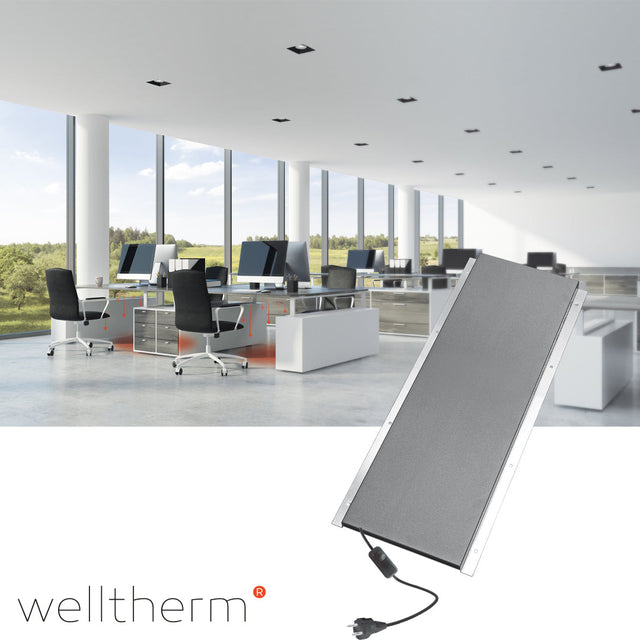
Desk heating for a comfortable home or office workspace
Desk heating provides localized warmth to your legs, feet, and the area around your chair. As a result, you do not automatically need to heat an entire room when only one workspace feels cold. This is practical in a home office, open office, reception area, counter, or study room.
There are self-adhesive panels for under the desk, narrow wall panels, heated footrests, and movable panels. Each type has a different heating zone and mounting method. Therefore, first look at how infrared heating works and then use this guide to compare size, power, control, and safe placement.

What is desk heating?
Desk heating is also called workspace heating or spot heating. An electric panel converts electricity into heat and directs it onto a small usage zone. With infrared, primarily the body and the material within the radiation range are heated. The system is therefore intended for personal comfort, not automatically for heating the entire room.
The palpable heat depends on the panel surface area, power, distance, direction, and how much open space is under the desk. Moreover, people react differently to temperature. A dimmable solution therefore offers more control than a model with only a single fixed setting.
When is local workplace heating useful?
- when your legs and feet remain cold while the room temperature is sufficient;
- at a desk next to a window, exterior wall, or cold floor;
- in a large room where only a few workstations are occupied;
- when working from home when the rest of the home does not need to be heated additionally;
- at a reception, cashier, or counter with a lot of local draft;
- for people who prefer a different comfort temperature than colleagues.
Address structural drafts, moisture problems, and poor insulation first. Office heating can improve local comfort, but it does not repair a leaking window or thermal bridge.
What types of desk heaters are there?
Infrared panel under the desktop
A thin panel under the work surface radiates heat to the legs. It uses little floor space and moves with the surface when securely mounted to a sit-stand desk. However, check whether the desktop, the adhesive layer, and the mounting are suitable for the specified temperature.
Self-adhesive mounting requires a flat, dry, and grease-free surface. Porous, rough, or heat-sensitive materials may require a different mounting method. Therefore, follow the product manual and view the available infrared panels for under the desk.
Panel against the rear or side wall
A narrow panel on the inside, back wall, or side wall of a desk can provide direct access to the legs. This position is useful when the surface is unsuitable for glue or when cable trays block the underside. First, measure the available knee space and avoid direct contact with the hot surface.
Heated footrest or floor mat
A footrest heats the area close to shoes and lower legs. A heated mat focuses primarily on the feet and the zone just above the floor. For both types, check the permitted floor finish, maximum temperature, and cleaning method. Not every product may be used on carpet or under an office chair.
Portable infrared panel
A free-standing infrared panel offers greater range and can be moved between workstations. This makes it suitable for temporary layouts or a workspace that also serves as a hobby room. However, it occupies more floor space and requires a stable position without a tripping hazard.
How do you choose the right heating zone?
First, determine which body part feels cold. For feet, a mat or footrest might be logical. For knees and lower legs, a vertical or angled panel often works better. If you also want to make your hands and upper body more comfortable, a larger panel or additional room heating is necessary.
Next, sit in your normal working posture. Measure the distance between your knees, the desk, the back panel, and the cable tray. Take into account chair movement, legroom, and any drawer units. This way, you choose a product that actually fits in the available zone.
How many watts does desk heating need?
For personal workspace heating, much less power is usually required than for an entire room. However, there is no universal wattage. The right choice depends on panel surface area, distance, shielding, drafts, and the desired heat intensity.
Therefore, compare this data:
- nominal and minimum adjustable power;
- dimensions and direction of the heated surface;
- recommended distance to legs and furniture;
- maximum surface temperature;
- dimmer, thermostat, timer or combination;
- length and position of the connection cord;
- permitted mounting and flooring materials.
A larger panel at a lower setting can feel more even than a small, hot surface. So do not choose the highest wattage exclusively. Also consider how the power is distributed across the heating zone.
Dimmer, thermostat, or timer?
A dimmer reduces the electrical power and, consequently, usually the heat intensity. A thermostat switches based on a measured temperature. A timer limits the operating time. These functions are not interchangeable.
For local desk heating, a dimmer is useful for personal comfort. A timer or smart plug can prevent the system from remaining switched on after working hours, provided the product allows this switching method. For multiple workstations, a suitable control system offers better overview. To this end, view infrared panels with a thermostat and check the maximum switchable power.
How much does office heating consume?
Calculate the maximum energy consumption using: power in kilowatts × usage time in hours. A 150-watt appliance is 0.15 kilowatts. With eight hours of continuous use, the theoretical maximum is 1.2 kWh. Multiply this by your own electricity tariff for a cost estimate.
A dimmer, thermostat, or timer can reduce actual consumption. However, this depends on the selected setting and duration of use. Therefore, do not compare fixed hourly rates without using the same power, rate, and working pattern.
Desk heater or electric heater?
A compact desk heater directs heat at one person and often has a lower power consumption than a whole-room electric heater. A convection heater primarily heats the air and can be useful when everyone in the room needs more warmth.
Local infrared heating is more suitable when only one or a few occupied workstations require comfort. However, for a cold room with dampness or insufficient insulation, you must assess the overall heating problem. Personal warmth does not replace a suitable indoor climate.
The best place under a desk
Place the panel where the radiation reaches both legs without knees or shoes touching the surface. Observe the minimum distance specified in the manual. Additionally, check that drawers, cable trays, and metal crossbars do not block the heat.
A position under the countertop provides a different sensation of warmth compared to mounting against a back wall. For a movable model, first test the direction and distance. This way, you discover which spot is comfortable before permanently attaching a self-adhesive panel.
Safely mount desk heaters on wood, metal, or sheet material
Check whether the office material can withstand the specified temperature. Solid wood, veneer, synthetic laminate, and metal react differently to prolonged heat. Metal surfaces can dissipate heat quickly, while some adhesives or finishes are sensitive to temperature.
Use only the prescribed adhesive, tape, screws, or brackets. Once applied, a self-adhesive plate often cannot be moved without damage. Clean and degrease the mounting site and allow the adhesive to cure when the instructions prescribe.
Desk heating for a sit-stand desk
With an electrically adjustable desk, the power cable must have sufficient freedom of movement at every height. Create a spacious cable loop and use strain relief. Then check the full movement from low to high without the cable pinching, chafing, or getting caught on furniture.
If you mount the panel to the moving blade, the dimmer and cord will also move with it. Secure loose controls so that they remain accessible. Never mount a panel in a location where the mechanism, frame, or motor ventilation is blocked.
Ergonomics in desk heating
Heat should support your working posture, not dictate it. Keep your feet stable on the floor or footrest and avoid sliding unnaturally close to the panel. First adjust your office chair and screen ergonomically, and then aim the heating zone.
Start on a low setting and increase gradually. A surface may feel warm before the skin signals discomfort, especially with prolonged exposure. Take breaks, move regularly, and follow medical advice if your sensation of warmth diminishes.
Safety of office heating
- Do not cover the heated surface with paper, clothing, or bags;
- Keep cables out of the walking path and away from chair wheels;
- Do not use a damaged plug, cable, or dimmer;
- connect the product according to the manual and avoid overloaded power strips;
- keep flammable materials at the prescribed distance;
- switch off the system before cleaning or moving it;
- Pay extra attention to accessibility for children and pets.
A “safe surface temperature” is not a general feature of all models. Check the technical specifications and ensure that unintentional prolonged skin contact is impossible.
Desk heating for multiple workstations
In a shared office, employees may have different comfort preferences. Individual control prevents a single central thermostat from being constantly adjusted. Therefore, make agreements per workstation regarding maximum setting, switching off, and cable management.
For multiple panels, check the total load on the circuit and power strips. For larger installations, use an appropriate control system and have the electrical distribution assessed. This ensures that local heating remains clear and safe.
Maintenance of office heating
Switch off the device, unplug it if permitted, and let it cool down. Remove dust with a soft, dry or slightly damp cloth according to the manual. Do not use abrasive agents on the heated surface.
Regularly inspect the fastening, adhesive edges, cord, plug, and controls. Discontinue use if loosening, discoloration, damage, or an unusual odor occurs. Have the product checked before switching it on again.
Common mistakes with desk heating
- mount a self-adhesive panel without cleaning the surface;
- place the panel too close to knees or shoes;
- run a cable over which chair wheels roll;
- treat dimmer, thermostat, and timer as the same function;
- moving a sit-stand desk without sufficient cable loops;
- mount the panel behind a drawer unit or metal beam;
- use a fixed cost claim without current electricity rate;
- expect a personal panel to heat an entire cold room.
Buy desk heating at Warmteshop
First, choose between heat for feet, legs, or a larger zone. Next, measure the available mounting space and check desk and floor material. Then, compare power, dimensions, controls, cord length, and safety distances.
Would you like to view independent company information? Then consult the external company profile of Warmteshop. For personal product advice, photos of the workplace, dimensions, and the intended use are valuable.
Other solutions for your workplace
For constant local heat, take a look at an infrared panel for the desk. If you want to move the panel between rooms, compare a free-standing model. For complete room heating, you can also ceiling panels or wall panels .
If the workplace requires new lighting at the same time, compare panels with lighting. For automatic control, you will find additional options with panels with a thermostat.
Frequently asked questions about desk heating
How quickly do you feel the heat?
That varies by type, capacity, distance, and construction. A thin local panel can be noticeable quickly, but the product specifications and warm-up time remain the guiding factors.
Can desk heating heat the entire room?
It is usually designed as personal supplementary heating. A heat loss calculation is required for the entire room, and other panels or a central system are often more suitable.
Is a self-adhesive panel movable?
Generally not without risk of damage to the panel, adhesive, or desktop. Therefore, test the position first and follow the assembly instructions.
Can the panel fit under any desktop?
No. Check material, flatness, heat resistance, clearance, and permissible mounting. If in doubt, choose a model with brackets or a freestanding solution.
Do I need a dimmer or a thermostat?
A dimmer regulates the heat intensity. A thermostat regulates by temperature, and a timer by time. Choose the function that suits your comfort and work rhythm.
Is it okay to plug desk heating into a power strip?
Only when the product manual, power strip, and total load permit. Do not use damaged or daisy-chained power strips and keep connections accessible.