


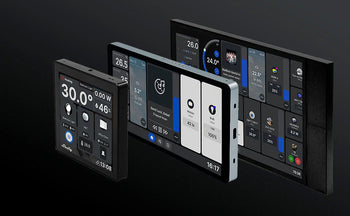
Shelly Home Automation makes lighting, electric heating, sockets, roller shutters, and other devices smart without having to replace the entire installation. Compact modules are placed behind a switch, in a flush-mounted box, or in the distribution cabinet. Additionally, adding smart plugs and sensors is even easier. This way, you start with one application and expand room by room later.
Therefore, choosing the right Shelly solution requires more than just looking at Wi-Fi or the number of channels. Moreover, the electrical load, available wiring, desired energy metering, the communication protocol, and integration with your smart home platform are at least as important. Below, you will discover which module suits your project and what to consider before installation.
What is Shelly Home Automation?
Shelly is a modular ecosystem for switching, measuring, and automating electrical applications. Many devices have a built-in web interface and operate via the local network. For remote control, the Shelly Smart Control app can be used. Those who want more extensive automation can connect compatible devices to platforms such as Home Assistant, Homey, Amazon Alexa, or Google Home.
Moreover, the retrofit approach is a significant advantage. As a result, existing push buttons and switches can often be retained. The smart function is located behind the control unit or in the distribution box. This makes the system attractive for renovations, apartments, and homes where you do not want to lay new wiring. However, always check that there is sufficient space and the correct power supply in the flush-mounted box.
Why choose smart Shelly modules?
- You can start small and expand the system room by room later.
- Many Wi-Fi models work without a separate central hub.
- Physical switches remain usable upon correct installation.
- PM models can measure power and energy consumption.
- Schedules, timers, scenes, and conditions automate daily use.
- Local control is possible on many models, in addition to optional cloud functions.
- There are solutions for flush mounting, plugs, sensors, and DIN rail mounting.
However, not every device supports the same functions. Energy metering, Matter, scripting, Bluetooth gateway functions, and maximum load vary by generation and product. Therefore, always check the technical specifications of the chosen model.
Which Shelly product group suits your application?
Within Shelly Home Automation, you choose a product based on the task it needs to perform. The groups below help you compare in a targeted way.
Relays for lighting and appliances
A built-in relay makes an existing lighting circuit or electrical appliance remotely switchable. For instance, a single-channel model controls one circuit. A two-channel module can manage two circuits or, if the model is compatible, control a motor for roller shutters and sun blinds. Pay attention to the number of inputs, the type of load, and the maximum permissible current.
Additionally, the designation PM usually stands for power metering. Such a module measures the current power and energy consumption of the connected circuit. This is useful when you want to know how much a heating appliance, boiler, or lighting unit actually consumes.
Smart plugs and power strips
For example, a smart plug is an accessible choice for standalone devices. You place it between the power outlet and the appliance. Then you can switch between outlets, set schedules, and monitor consumption for compatible models. A smart power strip offers multiple individually controllable outputs. Therefore, you always check the maximum power per output as well as for the entire appliance.
Dimmers and smart inputs
A dimmer controls suitable lighting steplessly and can execute scenes or schedules. Check in advance whether the LED lamps used are dimmable and whether the model requires a neutral wire. An input module, such as a Shelly i4, does not switch heavy loads itself. It translates push-button actions into scenes and automations. This is useful when a single button needs to trigger multiple actions.
Sensors and energy meters
In addition, temperature, humidity, motion, and contact sensors provide information that allows automation systems to respond. A door contact, for example, can trigger a notification. A temperature sensor can influence a heating scenario. Separate energy meters and professional modules are available for a complete circuit or a larger installation.
Pro models for the distribution cabinet
The Shelly Pro series is designed for DIN rail mounting in the electrical distribution cabinet. Depending on the model, network connections, multiple channels, and extensive metering functions are available. This type of installation is intended for a neat, central arrangement. Have the design and connection carried out or checked by a qualified installer.
Wi-Fi, Bluetooth, Zigbee and Matter explained
Within Shelly Home Automation, many modules use Wi-Fi for the daily network connection. As a result, they can function without a brand-specific hub. Bluetooth is used by various devices for quick initial configuration or for communication with compatible BLU sensors. Additionally, newer generations can support Zigbee and Matter.
Additionally, Matter is a standard that allows compatible smart home devices to work together across multiple ecosystems. Support is always model- and firmware-dependent. Zigbee operates as an energy-efficient mesh network but requires a compatible controller. The Shelly Wave series uses Z-Wave and also requires a compatible Z-Wave controller. Therefore, check the protocol before purchasing; “Shelly” does not automatically mean that every product works without a hub.
Gen3, Gen4, Plus, and Pro: what is the difference?
However, product generation indicates something about hardware, memory, and available features, but not automatically about the best choice for every situation. Gen3 models offer modern local functions and Bluetooth support. Depending on the model, Gen4 devices can combine multiple protocols such as Wi-Fi, Zigbee, and Matter. Plus products are compact modules for a wide range of applications. Pro models are primarily intended for DIN rail and more central installations.
Therefore, you shouldn't just compare the generation. Also look at the number of channels, energy metering, supply voltage, maximum load, motor function, and required wiring. A simpler model might be a better fit for a single lighting circuit than a more comprehensive device with features you don't use.
Shelly Home Automation for electric heating
With electric heating, a suitable relay or contactor solution can intelligently switch the power supply. A temperature sensor, schedule, or home automation platform then determines when heat is needed. This allows you to schedule rooms individually and prevent unused zones from being heated for unnecessarily long periods.
Switching capacity is crucial in this regard. A heating device can constitute a high and prolonged load. Never exceed the specified current, voltage, or the maximum power of the module. For higher power levels, a correctly sized contactor may be required, in which case the Shelly only performs the control function. Have this setup assessed by an electrician.
Moreover, energy metering provides insight into actual consumption, but does not automatically save energy. Savings are achieved through appropriate temperatures, proper schedules, zone control, and avoiding unnecessary operating hours. Therefore, use measurement data to improve settings step by step.
Local control, cloud and privacy
With Shelly Home Automation, many functions can be used within the local network via the built-in web interface, local actions, or integrations. For control from outside the home, the Shelly Cloud is a practical option. With suitable models, advanced users can work with MQTT, webhooks, scripts, or a local API.
Therefore, you determine in advance which functions must remain available without the internet. Local automation can continue to respond when the internet connection is lost, as long as the local network and the devices involved are active. Cloud-driven functions depend on the internet and the external service. Furthermore, regularly create an overview of device names, groups, and automations. This keeps a growing installation manageable.
Buying Shelly Home Automation: practical checklist
- Which circuit or device do you want to switch, dim, or measure?
- How many channels and physical inputs are needed?
- What are voltage, current, peak load, and type of load?
- Is a neutral wire present in the flush-mounted box?
- Do you want to measure power and energy consumption?
- Does a roller shutter, screen, or other motor need to be controlled?
- Do you use Wi-Fi, Zigbee, Z-Wave, Matter, or a combination?
- Which platform must the device work with?
- Is local service without internet a requirement?
- Does the module fit safely in the available housing?
Installation and electrical safety
First, completely switch off the power supply before working on the wiring and check for de-energization using suitable measuring tools. Follow the connection diagram of the exact model purchased. Product names may look similar, while terminals, power supply, and permissible load differ.
Next, ensure sufficient space, correct wire gauges, and solid connections. Do not install a module next to heat sources and do not exceed the specified ambient temperature. In damp rooms, additional requirements apply regarding zones, housing, and IP protection. Have fixed electrical connections carried out by a qualified professional if you do not possess the required knowledge.
Frequently Asked Questions
Do I need a hub for Shelly Home Automation?
For many Wi-Fi models, a separate Shelly hub is not required. Zigbee and Z-Wave devices do require a compatible controller. For Matter, the required infrastructure depends on the ecosystem used and the connection method.
Can I keep my existing switches?
Often, yes. Many flush-mounted modules are designed to work behind an existing switch or push button. Sufficient installation depth, suitable wiring, and a compatible switch type remain necessary.
Does Shelly work with Home Assistant and Homey?
Many Shelly devices can work with Home Assistant or Homey. The exact integration method and supported features vary by model, protocol, and software version. Check this for the specific device.
Can I use Shelly without the cloud?
Many models offer local control via their web interface and local protocols. However, some remote access, voice services, or app functions do use the internet or cloud services. Configure the installation according to your requirements for accessibility and privacy.
Which module do I need for energy measurement?
Choose a model that explicitly mentions power metering or PM and is suitable for the connected load. Check whether measurement is performed per channel or only for the entire unit.
Is Shelly suitable for heating?
Yes, provided the chosen circuit is suitable for the electrical load and the control system is correctly constructed. A contactor may be required for powerful heating circuits. Temperature control and safety devices must remain reliable independent of the smart control.
Start smart and expand in a controlled manner
In short, with Shelly Home Automation, you make an existing installation smarter step by step. Start with a clear application, such as energy metering, lighting, or a single heating zone. Then choose the right protocol and have the electrical load checked. This way, you build a system that remains clear, secure, and easy to expand later on.