

Choosing wireless Wi-Fi thermostats: complete buying guide for 2026
, by Warmteshop, 15 min read
, by Warmteshop, 15 min read
What if the smartest thermostat isn't the one with the most features, but the one that fits your heating system? With wireless Wi-Fi thermostats, the right choice starts with the connection and control of your heating…
What if the smartest thermostat isn't the one with the most features, but the one that fits your heating system? With wireless Wi-Fi thermostats, the right choice starts with connecting and controlling your heating. After that, you look at features such as app control and heating schedules.
Are you unsure if a thermostat works with your installation, or what the difference is between a thermostat, receiver, and gateway? An incorrect combination can cause functions not to work as expected. Therefore, choose based on your heating system and living routine, not just on the list of smart features.
In this buying guide, you will learn what to look for in electric heating and infrared panels, the role the various components play, and which features offer practical benefits. You will also discover how schedules and remote control can adjust the temperature to suit your day. This way, you choose a solution that supports comfort and helps limit unnecessary heating.
Do you want to come home to a pleasantly warm room without having to turn on the heating only once you are inside? With a wireless thermostat with Wi-Fi, you can control the temperature on the device itself and, if the model offers this option, via an app on your phone. This makes it easier to adjust the heating to your daily schedule.
A wireless Wi-Fi thermostat measures the temperature and controls the heating wirelessly. Wi-Fi adds a network connection, allowing you to adjust settings remotely. Wi-Fi control makes it possible to change the temperature via an app when you are not near the thermostat. The general operation of smart thermostats is also explained under smart thermostats.
Wireless does not automatically mean that a thermostat works on every installation without modifications. For example, the thermostat can communicate wirelessly with a receiver, while that receiver is connected to the heating control unit. Which components are required depends on the model and your heating system.
With local control, you set the temperature directly on the thermostat. With app control, you can also adjust available settings remotely. An automatic schedule allows you to set desired temperatures for fixed times, so that the heating aligns with your living rhythm. Some models combine these options, but the exact functions vary by model.
A thermostat can be useful for infrared panels, electric underfloor heating, and electric radiators, among others. The control method differs per system. Electric heating, for example, may require a suitable thermostat and receiver, while underfloor heating requires a control solution designed for that system. If you are interested in infrared panels, view the collection of wireless thermostats for available control options.
A combi boiler requires a thermostat compatible with the specific boiler control system. Therefore, do not assume that a thermostat for electric heating or infrared panels will work with a combi boiler. Before choosing, check whether the model matches the control system and connections of your installation. That is more important than the number of smart features listed on the packaging.
In short: first choose based on your heating system and the associated control components. Then determine whether you want to control locally, adjust settings via an app, or heat using automatic schedules. This way, you tailor smart control to your home and living rhythm.
The best choice doesn't start with the app or the appearance, but with how your heating is controlled. First check the type of heating, and then look at the features. Compatibility determines whether the thermostat can control the heating properly. Extra smart features are only useful if the basics are right.
| Heating system | Required rule component | Pre-purchase check |
|---|---|---|
| Infrared panels | A thermostat and, depending on the model, a receiver | Check if the combination is intended for infrared panels and how many receivers are supported. |
| Electric underfloor heating | A thermostat suitable for the relevant control system | Compare the type of heating and the connection method with the model specifications. Also view the information about electric underfloor heating. |
| Combination boiler | A thermostat that matches the boiler's control system | Check whether the model is intended for combi boilers and the associated control system. |
| Coupled Ecaros system | A gateway when the chosen setup requires it | Check which thermostat and components within the system work together. |
For infrared panels, the Inngenso Wi-Fi thermostat with receiver is a concrete example. The product information describes how multiple panels can be controlled via a single common thermostat and indicates that the Inngenso IRWIFI V2 can control multiple receivers. The exact number and suitable combination depend on the current product specifications. Do not assume that every wireless thermostat can control the same panels or receivers.
The same principle applies to electric underfloor heating and electric radiators: match the thermostat to the system's control. A Wi-Fi function in itself says nothing about the electrical connection or suitability.
According to the product information, the SALUS IT700WiFi is designed for combination boilers. This makes this model an example to consider if you want to control a boiler. However, the connection and control must match your installation. The Ecaros X3D Gateway has a different function: it forms the central link within an Ecaros smart home installation. A gateway is not automatically required with every thermostat; that depends on the chosen combination.
ENERGY STAR provides background information on smart thermostats and energy saving, including features such as location-based control. The explanation regarding independently certified energy-saving products is general information and does not prove that a specific model is suitable for your heating system. Therefore, always compare system compatibility and required components. This allows you to search more specifically for a suitable combination within the collection of thermostats and control components .
The most convenient features align with your daily routine. Start with basic controls, then look at automatic control options, and finally determine if additional connections add value. Wireless Wi-Fi thermostats can combine various functions, but not every model offers the same controls or automation.
With app control, you adjust the temperature without walking to the thermostat. This is convenient if you come home later or need to use a room unexpectedly. A network connection is required for remote control. You control the thermostat locally on the device itself, provided the model offers that option.
With a weekly schedule, you set fixed temperatures for times of your choosing, for example, a lower temperature when you are away and a more comfortable temperature when you are using the room. A timer is useful for a temporary change, such as extra heat during a cold spell, without having to permanently adjust the fixed schedule.
With temperature zones, you control different rooms separately, provided your heating system and thermostat setup support this. This allows you to tailor the heating to the rooms you use. Schedules and zones can help limit unnecessary heating, but the result depends on your settings, usage, and home. Therefore, a fixed savings percentage cannot be promised. Milieu Centraal provides additional information on choosing a smart thermostat and how to use it.
Some models offer extras such as open-window detection, a vacation mode, or insights into energy consumption. These features can make operation easier, but are not standard on every thermostat. Automation based on presence or location also varies by model and may depend on app or network functions.
Voice control can be useful if your thermostat works with a platform such as Google Assistant, Amazon Alexa, or Apple Home. These are examples of possible connections, not standard features. Also, check if the connection is compatible with your phone and smart home setup.
If you are primarily looking for a programmable thermostat, a weekly schedule may suffice. If you want to adjust settings on the go, check the app control and network requirements. For the Ecaros X3D, wireless, programmable control and control via an app are mentioned. Check for each model which features are actually included. View the wireless Wi-Fi thermostats and compare the options with your living routine.
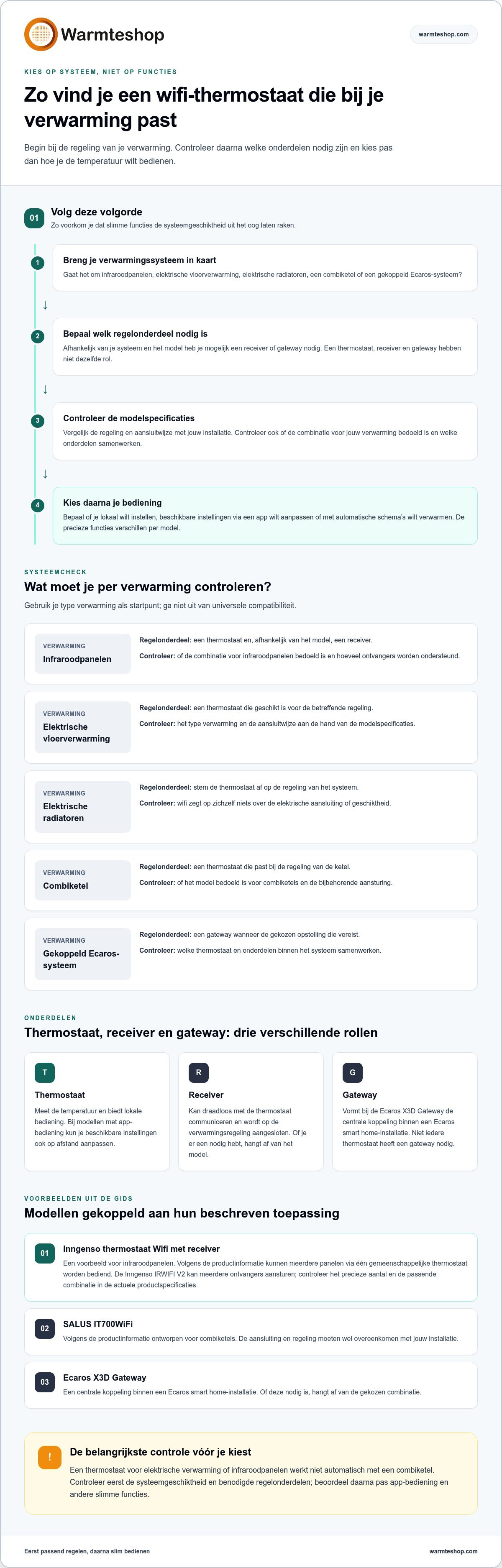
Choosing a thermostat becomes clearer if you compare the technology first and then the ease of use. A common misconception is that every wireless thermostat automatically fits every electric heater. Wireless communication describes how components communicate with each other, not whether they are electrically and functionally compatible.
Do not order a receiver or gateway separately based on name or appearance. Components available separately do not automatically form a working set. If you have any doubts about connections or installation, you can have the technical situation assessed by a qualified installer.
A long list of features seems attractive, but it is of little help if the model does not suit your heating system. Also, do not choose based solely on design. First, compare the controls and necessary components. Then, assess whether app control, schedules, or other extras align with how you use the space.
Do you want to compare possible control solutions side by side? Then view the broader overview of thermostats and related components. Compare models based on your heating system, not just on individual functions.
Do you have a clear understanding of your system and requirements? View the wireless Wi-Fi thermostats and compare which controls and components suit your situation.
A useful comparison starts with the heating you want to control. Next, look at the controls and the components included with the model. The examples below show how wireless Wi-Fi thermostats differ from one another. The features mentioned apply to specific models and are not general characteristics of all thermostats.
| Model | May fit with | Described position | Checkpoint |
|---|---|---|---|
| Inngenso thermostat WiFi with receiver | Infrared panels | Wireless communication and app control; the product information describes control of multiple panels via a common thermostat. | Check the current combination of thermostat, receiver, and panels. |
| Ecaros X3D wireless thermostat | Anyone looking for programmable control | Wireless and programmable, with app control according to the product information. | Check if the required parts fit your heating system. |
| Ecaros X3D 16A surface-mount receiver | A suitable Ecaros setup | Stated switching capacity up to 16 amperes. | Check if this receiver is intended for your combination and installation. |
| SALUS IT700WiFi | A combination boiler | According to the product information, intended for combination boilers. | Compare the boiler control and connection with the model specifications. |
| SALUS IT800WiFi | Anyone looking for a standalone thermostat | Described as a stand-alone smart thermostat. | Check which controls and functions belong to this model. |
The Inngenso WiFi V2 is an example of a thermostat with wireless communication and app control for infrared panels. According to the product information, multiple panels can be controlled via a single common thermostat. This can be practical if you want to control several panels together. The appropriate receiver depends on the system and the installation.
According to the product information, the Ecaros X3D 16A surface-mounted receiver has a switching capacity of up to 16 amperes. Consider this a technical specification, not proof that the receiver is suitable for every electric heater. Check the combination with the thermostat and the connected system.
For a combi boiler, the product information lists the SALUS IT700WiFi as the intended model. The SALUS IT800WiFi is described separately as a stand-alone smart thermostat. Do not confuse these applications: compare the specifications of each model with what you want to control. First determine which system you want to control and which controls are suitable for it.
View the thermostats and associated parts , and compare the models with your heating system and control preferences.
You do not choose the right wireless Wi-Fi thermostats based on the longest feature list. Start with the heating system and determine which thermostat, receiver, or gateway suits it. Then compare the control options: local, via an app, or with automatic schedules.
A suitable thermostat gives you more control over your living comfort. With weekly schedules, you can adjust the heating to the times when you are at home or using a room. Remote control is convenient if your plans change. How targeted your heating is also depends on your settings, usage, and home.
Warmteshop sells thermostats for various heating solutions and offers heat calculations and professional installation services. This allows you to tailor your choice to the control system and application in your home.
View the wireless Wi-Fi thermostats and choose the control system that suits your heating. With the right combination, you regulate the heat more comfortably and with greater attention to when you need it.
No, a wireless Wi-Fi thermostat does not automatically work with every heating system. The thermostat must match the way your heating is controlled and connected. For example, a model designed for infrared panels is not automatically suitable for a combi boiler or electric underfloor heating. Therefore, check the product specifications of the thermostat and any receiver or gateway. Compatibility is more important than extra features you cannot use.
No, Wi-Fi is primarily needed for app functions, such as adjusting the temperature remotely. Depending on the system and model, a wireless thermostat can also communicate with a receiver without Wi-Fi. Some thermostats can continue to follow their set program if the internet connection is lost, but control via the internet will not be available. Consult the manual to see which functions continue to work locally.
Yes, a Wi-Fi thermostat can help limit unnecessary heating if you tailor schedules and settings to your daily usage. For example, you can set a lower temperature when you are not using a room and adjust it when you return. The potential savings depend on your home, heating system, settings, and behavior. Therefore, a thermostat does not guarantee a fixed savings percentage; the result depends in part on how you use it.
The thermostat measures or regulates the desired temperature and transmits a heating request. A receiver receives this wireless command and switches the heating on or off when the setup requires it. A gateway connects compatible devices to a network or smart home system. Not every installation requires all three. Which components work together varies by thermostat and heating system. Therefore, compare the product specifications of the complete combination.
Yes, there are thermostats designed to control infrared panels, but not every wireless model is compatible. Some combinations use a receiver to control the panels. According to the product information, the Inngenso IRWIFI V2 is designed for infrared panels and can control multiple receivers. Before choosing, check which thermostat and receiver are compatible with your panels and installation to ensure the components work together.
This is possible if the chosen model supports app control and is connected to your network. Depending on the thermostat, you can adjust the temperature or manage a schedule via the app when you are not at home. Not every wireless thermostat has this capability: wireless communication with a receiver is different from control via a phone. Therefore, check the features of the specific model and any app requirements.
Not always, but professional installation can be wise if you are unsure about the wiring, connection, or required parts. A wireless thermostat may still require a receiver that connects to the heating control system. Have technical connections assessed by a qualified installer, especially when the correct combination is unclear. Warmteshop offers professional installation services for heating solutions so that the control system can be tailored to your system.


